The All-Seeing Eye
This application provides an interactive exploration of the ANTHROPIC_SURVEILLANCE_MAP.md report. It visualizes the technical analysis of the tracking infrastructure documented on the claude.ai website. The report documents a comprehensive surveillance system capable of capturing detailed user interactions, including keystrokes and editor inputs.
Infrastructure Overview
This diagram shows the flow of your data from browser to Anthropic's analytics backend.
Page load triggers tracking initialization
Event listeners (click, keydown, touch) & UUID generation
editor.main.js instrumentation & analytics core
Sends data via navigator.sendBeacon() to Cloudflare
Session aggregation & user profiling
Real-time access to user sessions, keystrokes, heatmaps & A/B test data
Key Component File Sizes
Large JavaScript files indicate significant tracking complexity.
Key Findings & Capabilities
The report documents a wide range of surveillance capabilities. The matrix below outlines the privacy impact of each data collection method.
Surveillance Capabilities Matrix
| Capability | Implemented | Data Collected | Privacy Impact |
|---|---|---|---|
| Page Views | โ | URL, referrer, timestamp | Medium |
| Click Tracking | โ | Element path, timing | High |
| Keystroke Monitoring | โ | Event type, timing | CRITICAL |
| Form Interaction | โ | Element paths | CRITICAL |
| Code Editor Input | โ | Via editor.main.js | CRITICAL |
| Mouse Tracking | โ | Pointer events | High |
| Session Stitching | โ | UUID + tokens | High |
| Memory Profiling | โ | Heap sizes | Medium |
What Anthropic Can See
This infrastructure allows for deep analysis of user behavior. Here are the documented capabilities:
User Journey Reconstruction
Ability to replay a user's session, including every page visited, button clicked, and form interacted with, in the exact sequence and timing.
Code Editor Activity
Analysis of what users type into prompts, typing speed, editing patterns (like backspaces), and use of code completion.
Performance Profiling
Measurement of a user's device speed (memory, timing) and network capabilities (resource load times).
Interaction Patterns
Detection of user hesitation before clicking, reading time (based on visibility duration), and feature usage frequency.
Data Flow Architecture
The report outlines a multi-stage process for how data is collected, processed, and transmitted. This flowchart visualizes the lifecycle of a single piece of user data.
-
1
Stage 1
Initialization
Page load executes tracking script. A UUID is generated, and event listeners are injected to capture clicks, keys, and performance.
-
2
Stage 2
Data Collection
User interactions (clicks, keystrokes) are captured, tagged with a CSS selector path and timestamp, and queued in a memory buffer.
-
3
Stage 3
Transmission
On page unload or timer, data is serialized and sent via
navigator.sendBeacon()tocloudflareinsights.com. This survives page closing. -
4
Stage 4
Backend Processing
Cloudflare ingests the data, reconstructs the session, and profiles the user. Anthropic gains access to this analyzed data via dashboards and APIs.
Legal & Compliance Concerns
The report raises significant legal and ethical questions regarding this data collection, particularly concerning user consent and data minimization principles.
- No Explicit Consent: Tracking allegedly starts immediately on page load without a cookie banner or opt-out mechanism for RUM (Real User Monitoring).
- Third-Party Processing: Data is sent to Cloudflare, a third-party processor, without users being informed or a data processing agreement being disclosed.
- Excessive Data Collection: Keystroke monitoring and element-level tracking may violate Article 5 (data minimization).
- No "Do Not Sell" Option: Sharing data with Cloudflare could potentially constitute a "sale" under CCPA definitions, yet no opt-out is provided.
- Lack of Disclosure: The privacy policy may not specifically cover the scope of RUM data collection or the involvement of Cloudflare.
- Wiretap Act (18 U.S.C. ยง 2511): The report suggests that real-time keystroke monitoring could be interpreted as a form of electronic surveillance.
- Computer Fraud and Abuse Act (CFAA): Collecting detailed user input and interactions may be seen as exceeding authorized access to the website.
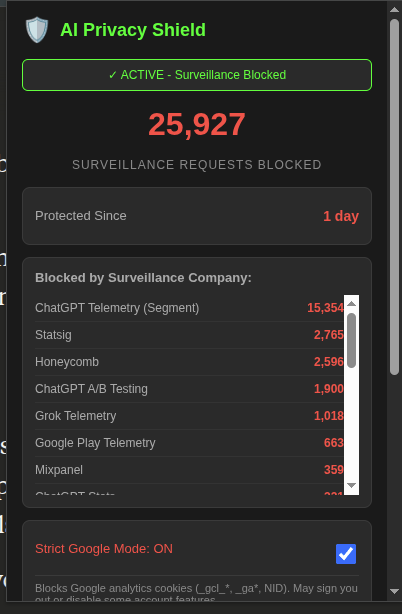
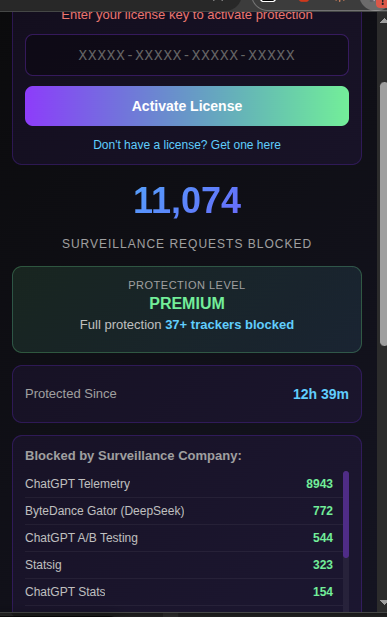
The Solution: AI Privacy Shield
In response to these findings, the AI Privacy Shield browser extension was developed. It's a surgical tool designed to block this specific surveillance infrastructure *without* breaking the core functionality of the AI platforms.
AI Privacy Shield
Active Protection
A Multi-Layered Defense
The extension employs a multi-layered strategy to neutralize tracking, based on the evidence found across all major AI platforms.
Tier 1: Tracker Blocklist
Based on blocklist.json, the shield blocks requests to known surveillance domains:
*statsig*(Session Recording)*honeycomb.io*(Telemetry)*segment.io* / *.com*(Analytics)*cloudflareinsights*(RUM / Keystroke Logging)*amplitude.com*(Product Analytics)*google-analytics.com*(Tracking)*play.google.com/log*(Gemini Telemetry)*gator.volces.com*(ByteDance Telemetry)- ...and 29+ other patterns.
Tier 2: Surgical Header Stripping
To prevent A/B testing and fingerprinting by Google, the shield removes specific request headers, as defined in google_header_scrub.json:
"operation": "remove", "header": "x-client-data" (A/B Experiment ID)
"operation": "remove", "header": "sec-ch-ua" (Fingerprinting)
"operation": "remove", "header": "sec-ch-ua-platform" (Fingerprinting)
"operation": "remove", "header": "sec-ch-ua-mobile"
...and 7+ other sec-ch-ua-* headers.
Tier 3: Strict Mode Cookie Killing
Based on cookie-killer.md and popup.js, an optional "Strict Google Mode" actively deletes tracking cookies on page load:
_gcl_aw(Google Click Tracking)_gcl_dc(DoubleClick)_ga(Google Analytics)_ga_*(GA Property IDs)NID(Google Network ID / Cross-Site Tracking)